





What is an IP?
An IP address (Internet Protocol address) is a numerical label assigned to every device that connects to a network. Think of it as a device’s mailing address on the Internet — used for routing packets between devices, servers and services.
Common IP formats:
- IPv4 — 32-bit addresses (example:
192.0.2.1). - IPv6 — 128-bit addresses for a larger address space (example:
2001:0db8::1).
Why IPs matter: IPs are used for routing, analytics, geolocation, rate-limiting and security logging. While an IP can suggest a geographic region or ISP, it does not perfectly identify a person by itself.
What is Tor?
Tor (The Onion Router) is a privacy network that helps users route traffic through multiple volunteer-operated servers (relays) to obscure the origin of the traffic. It uses layered encryption — like layers of an onion — so each relay only knows the previous and next hop.
Key concepts:
- Entry (Guard) node: the first relay you connect to.
- Middle relays: intermediate hops that carry encrypted traffic.
- Exit node: the last relay that sends the request to the destination; the destination sees the exit node's IP.
Benefits: improved privacy, traffic obfuscation and the ability to access services with less direct traceability to your real IP.
Limitations: Tor is not perfect anonymity — browser leaks, plugins, cookies, and user behavior can deanonymize a user. Exit nodes can observe unencrypted traffic: always use end-to-end encryption (HTTPS).
About this tool — v2.0
High-level description: v2.0 is an IP/route management and privacy utility that helps users switch network routes (Tor, SOCKS proxies, and more), launch isolated browser sessions, check the public-facing IP, and automate route rotation for testing. It’s designed for researchers, QA, and privacy-minded users.
📦 How to Install and use (Video Guide)
📦 How to Install the Tool
  git clone https://github.com/karthi-the-hacker/SocialEngineer.git
  cd SocialEngineer
  sudo apt install tor -y
  pip install -r requirements.txt
  chmod +x install.sh
  sudo ./insatll.sh

  sudo python3 SocialEngineer.py
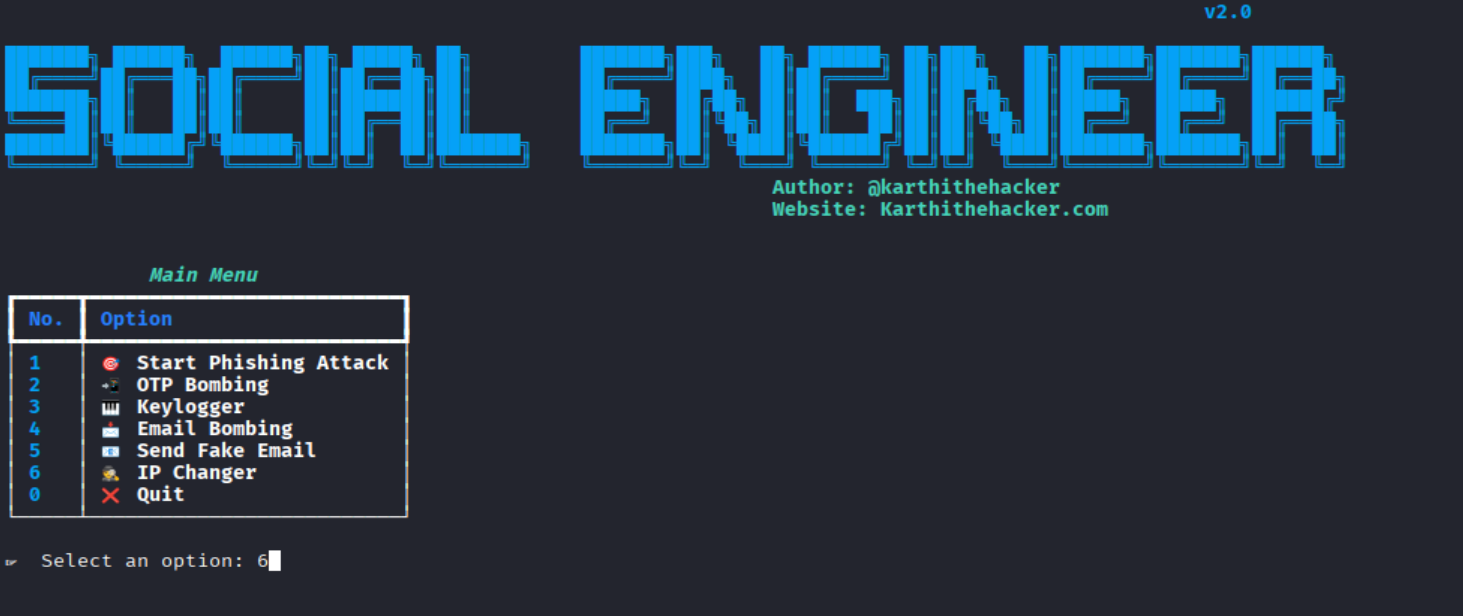
Type 6 and hit enter
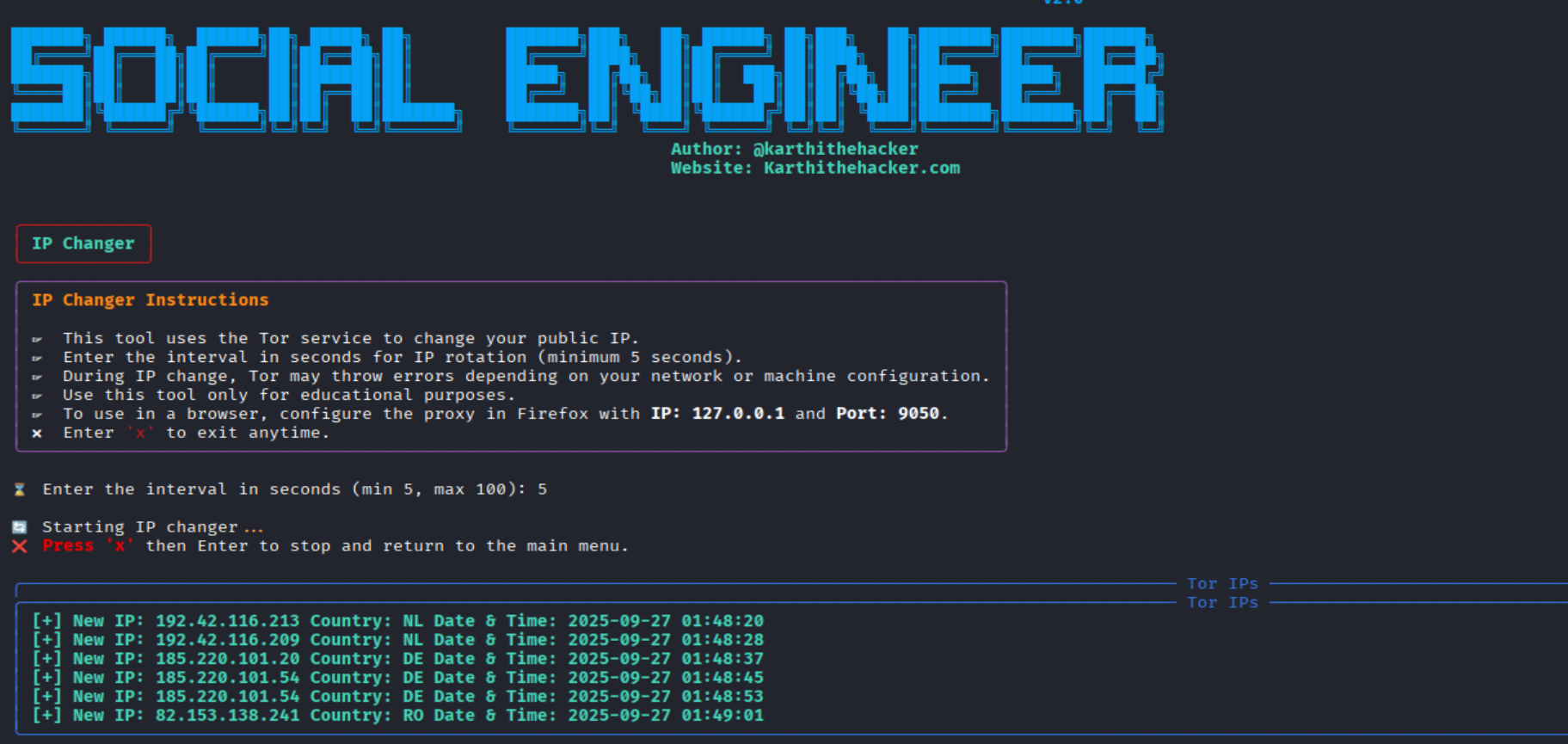
Main features
- Simple CLI/interactive menu for selecting modes (Tor, system proxy, proxychains, etc.).
- Launches browsers pre-configured to use the chosen route (Chromium, Chrome, Firefox).
- Public IP check and route verification.
- Automation for rotating exit IPs across a list of targets (for authorized testing).
- Session isolation to reduce cross-session data leakage.
Example usage / quick commands
Launch Chromium via Tor SOCKS5:
chromium --proxy-server="socks5://127.0.0.1:9050"
Set system-wide proxy for terminal apps (Linux):
export ALL_PROXY="socks5h://127.0.0.1:9050"
Proxychains configuration (force any app through Tor):
    # add to /etc/proxychains.conf
    socks5 127.0.0.1 9050

    # then run:
    proxychains4
How it works (high-level)
- The tool orchestrates local privacy services (Tor client / proxy) and configures the target application or environment to route traffic through them.
- It can launch an isolated browser profile configured to use the SOCKS5/Tor proxy so cookies, localStorage and other state are separated.
- It includes checks (public IP verification) to confirm traffic leaves via the chosen route.
Limitations & Risks
- No absolute anonymity: Tor and proxies reduce traceability but do not guarantee full anonymity. Browser fingerprinting, plugins, or user action can reveal identity.
- Exit node visibility: Exit nodes can view unencrypted (HTTP) traffic. Use TLS (HTTPS) for sensitive communication.
- Performance: routing through relays adds latency; browsing will be slower than a direct connection.
- Legal & ethical considerations: using IP-masking to perform illegal acts or unauthorized testing is unlawful. Always have explicit permission before testing systems you do not own.
Responsible use & best practices
- Use the tool only for legitimate privacy needs, defensive research, QA, or with explicit authorization.
- Prefer encrypted protocols (HTTPS, SSH, TLS) when sending sensitive data.
- Keep Tor and related tooling up-to-date and avoid mixing personal accounts with anonymized sessions.
- Document test scopes and obtain written permission for any external testing (bug bounties, penetration testing, etc.).
Who should use this?
Recommended for:
- Security researchers and pentesters (with permission).
- QA engineers needing to test geo-dependent behavior.
- Developers who want to validate application behavior across different public IPs.
- Privacy-focused users who understand the limits of anonymity tools.
Check out my previous blog
🔗 Want to dive deeper? Check out my previous blog where I covered more insights and techniques related to this tool. You’ll find practical knowledge, tips, and background information that will help you understand how everything works step by step.

👉 Click here to explore my previous blogs
Free Course + Certificate
🎓 Don’t stop here — boost your skills with my Free Ethical Hacking Course! This course is designed for beginners and advanced learners, and once you complete it, you’ll get a verified certificate.
- ✅ 100% Free
- ✅ Certificate of Completion
- ✅ Covers practical topics step by step
Quick FAQ
Will this make me invisible online?
Can websites detect Tor users?
Is it safe to log into personal accounts over Tor?
Legal & Ethical Notice
This content is for educational purposes. The author and maintainers do not endorse illegal activity. Misusing privacy tools to harass, defraud, access systems without authorization, or break laws is illegal and unethical. Always follow local laws, platform terms of service, and obtain explicit written permission before testing systems you do not own.
References & resources
- Tor Project — Official documentation & downloads.
- Proxychains / proxy tools — system forcing for CLI apps.
- Browser documentation — how to configure SOCKS proxies in Chromium/Firefox.
Professional Certified Social Media & Mobile Hacking | 100% Live Hacking in Tamil | Real Apps, No labs complete practical

🔥 Limited-Time Offer: ₹5,500 course now at just ₹2,999!
Enroll / Learn more: https://university.cappriciosec.com/COSM.html
What you get
- Live, hands-on pentesting on real mobile applications — no fake labs. Lessons use safe, consented test targets and focus on discovery, validation, and responsible disclosure. 🔍
- Web development & secure coding (HTML & PHP) — learn secure web app design, input validation, session management, and how to write PHP applications that resist common vulnerabilities (SQLi, XSS). 💻
- Web servers & hardening (Apache, PHP) — configuration best-practices, secure headers, TLS deployment, and server-side logging for incident response. 🛡️
- Phishing, social engineering & awareness — understand attacker methods, how to simulate phishing safely for training, detection signals, and organisational countermeasures. 🎯
- Account security & social platform protections — defensive strategies to protect social media and online accounts, incident response, and safe recovery procedures (not step-by-step attack instructions). 🔐
- Spear-phishing, IDN homograph awareness & mitigation — how targeted email attacks work, how IDN tricks are used, and defensive steps for detection, email authentication (SPF/DKIM/DMARC), and user training. 📧
- Blue-team & counter-hacking techniques — detection, containment, deception, honeypots, and how to ethically simulate adversaries to improve defenses (red/blue exercises in controlled labs). 🛡️⚔️
- Tools & methodology — responsible use of industry tools for assessment and defense: Burp Suite for security testing (scanner & manual review in safe environments), Netcat for network troubleshooting, and secure system administration tools. 🧰
- System security & incident analysis — defensive system hardening, log analysis, basic forensic triage, and how to investigate incidents without enabling malicious activity. 🔎
- Real-world scenarios & tools — case studies focused on defensive takeaways, remediation playbooks, and how to translate findings into bug reports, CVEs, or employer-ready artifacts. 📘